
Sheru Bhai-KI-Video und Foto Schritt für Schritt erstellen
Aktualisiert am 12. November 2026
Kurze Antwort
Lade ein Foto einer erwachsenen Person hoch und wähle den Boss-Auftritt am Palasttor oder den Gang zu zweit. Erstelle dein Standbild und 8-Sekunden-Video. Insgesamt kostet es inklusive Foto 236 Guthabenpunkte ($2.36) bei 480p oder 516 ($5.16) bei 720p. Lade beides herunter und ergänze beim Posten eigene Dialoge, wenn du eine Stimme möchtest.
Was du brauchst
- Ein Foto von dir oder einer erwachsenen Person mit Zustimmung, als JPG, PNG oder WebP, bis 10 MB.
- Ein Konto zur Anmeldung vor der Erstellung.
- Ein Guthabenpaket: $5 für 500 Punkte, $9 für 900 oder $19 für 1,900, ohne Abo.
Schritt 1 — Das richtige Foto wählen
Nutze ein Foto im Stehen, ab den Knien oder in voller Länge, mit sichtbaren Händen und gleichmäßigem Licht. So erkennt die Boss-Szene deinen Körperbau und deine Haltung klar.
Für die Duo-Szene eignet sich ein scharfes Foto von vorn mit gut erkennbarem Gesicht. Vermeide Hüte, Kapuzen und Sonnenbrillen.
Schritt 2 — „Werde Sheru Bhai“ oder „Du + Sheru Bhai“ wählen
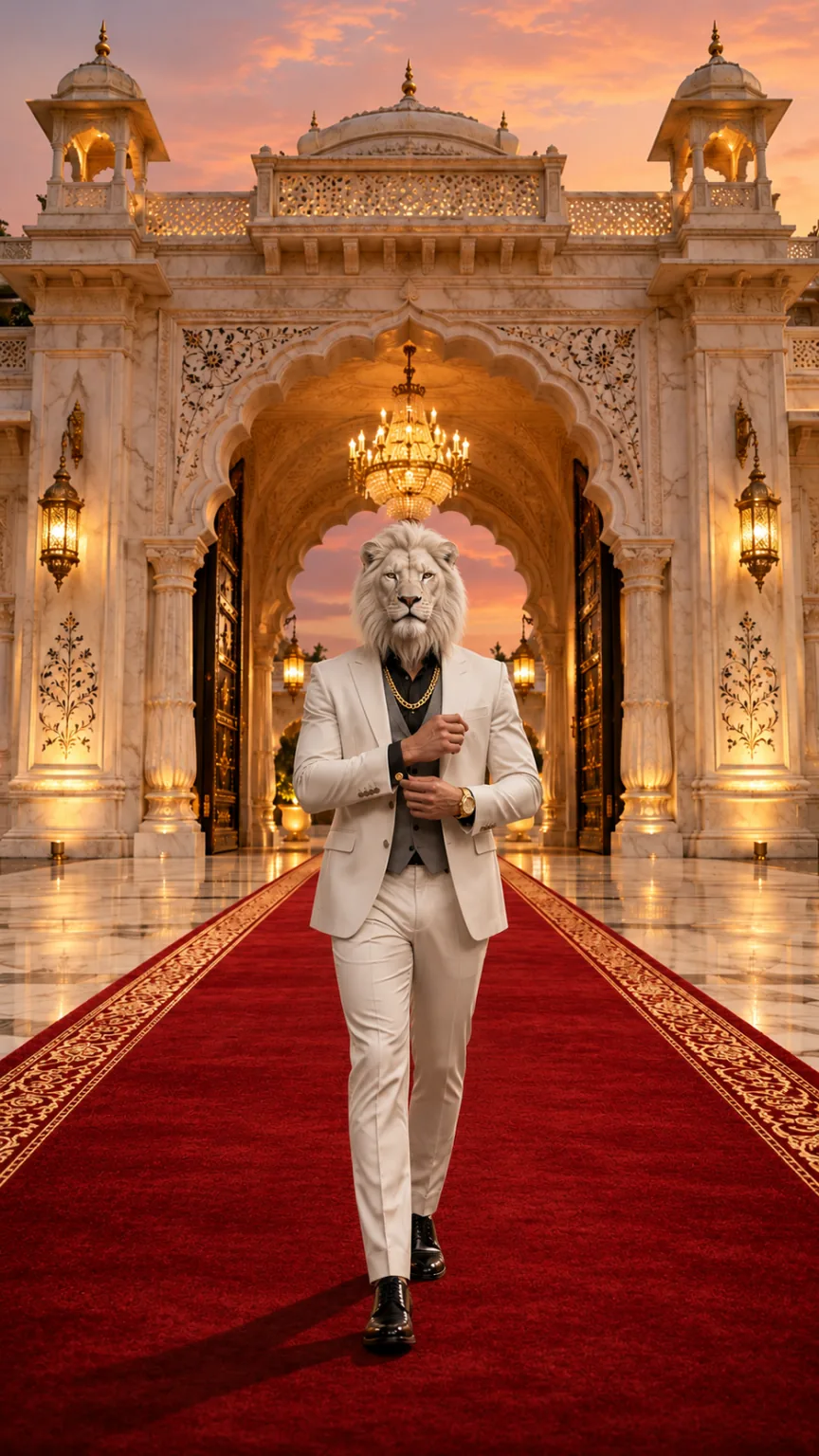
„Werde Sheru Bhai“ gibt dir einen weißen Löwenkopf, einen weißen Dreiteiler und einen Auftritt auf dem roten Teppich am Palasttor. Die Duo-Szene behält dein Gesicht: Im schwarzen Anzug gehst du nachts langsam neben dem Boss über eine Einfahrt mit Supersportwagen.
| Modus | Funktion | Geeignetes Foto | Guthabenpunkte |
|---|---|---|---|
| Werde Sheru Bhai | Ersetzt dein Gesicht durch einen weißen Löwenkopf für den Boss-Auftritt am Palasttor | Stehend, ab den Knien oder ganz, beide Hände sichtbar | 236 (480p) / 516 (720p) |
| Du + Sheru Bhai | Behält dein Gesicht und zeigt dich im schwarzen Anzug neben dem weißen Löwenboss | Stehend, ab den Knien oder ganz, scharfes Gesicht von vorn | 236 (480p) / 516 (720p) |
Schritt 3 — Im Studio erstellen
Melde dich an und öffne das Studio. Lade dein Foto hoch und wähle Szene und Videoqualität. Die Szenen-Prompts sind eingebaut, du musst keinen schreiben.
Das Studio erstellt zuerst das Standbild und animiert es danach zum Video. Plane etwa 3–8 Minuten ein. Du kannst die Seite verlassen und später zur Aufgabenansicht zurückkehren.
Schritt 4 — Foto und Video herunterladen
Speichere das Standbild separat als Profil- oder Statusbild. Es ist das erste Bild, aus dem dein Video entsteht.
Lade das 8-Sekunden-MP4 im Format 9:16 in gewählten 480p oder 720p ohne Wasserzeichen herunter. Es enthält originale KI-Musik und Soundeffekte, ohne Gesang oder Dialoge.
Schritt 5 — Verantwortlich posten
- Füge bei Bedarf in Instagram, CapCut oder InShot einen Satz auf Hindi oder Urdu oder einen angesagten Sound hinzu.
- Kennzeichne das Ergebnis beim Teilen als KI-generiert.
- Nutze nur dein eigenes Foto oder das eines Erwachsenen, der zugestimmt hat.
Kostenlose Sheru Bhai-KI-Prompts für Foto und Video
Mit diesen Szenen-Prompts erstellt die Website das Sheru Bhai-Foto und das Auftrittsvideo. Kopiere sie in ein Bild- oder Videomodell mit Referenzbild-Unterstützung. Die Ergebnisse hängen vom gewählten Modell ab.
Englische Prompts funktionieren am besten. Hier sind sie eingebaut: Lade dein Foto hoch und wähle eine Szene, ohne etwas schreiben zu müssen.
Prompt für ein Sheru Bhai-KI-Foto
Keep image 1 exactly: the marble palace gate, the red carpet, the golden dusk light and the low camera angle. Place one full-body figure in the center of the red carpet, walking toward the camera. Build this figure from the adult person in image 2: keep their body build, height, posture, skin tone on the hands and their rings or watch if visible. Replace the whole head with a photorealistic majestic white lion head with a thick snowy mane, calm amber eyes and mouth closed, attached naturally to the neck and in proportion with the shoulders (not oversized, not floating). Dress the figure in a tailored white three-piece suit with a grey waistcoat, black shirt, a thick gold chain, a gold watch and polished white shoes. Exactly one figure, five fingers on each hand. No other people or animals, no added text, logos or watermark. Photorealistic, vertical 9:16.Foto-Prompt „Du + Sheru Bhai“
Keep image 1 exactly: the wet night driveway, the two black supercars with headlights on, the mist, the lighting and the white-lion-headed boss in the white suit on the right. Add the adult person from image 2 on the left, full body, walking side by side with the lion boss toward the camera, dressed in a sharp black suit. Keep the person's face, hairstyle, skin tone and body from image 2 clearly recognizable; the person keeps a human head. Exactly two figures: the person and the lion boss. No added text, logos, badges, license plates or watermark. Photorealistic, vertical 9:16.Prompt für ein Sheru Bhai-KI-Video
Animate the image as the first frame. One continuous 8-second vertical 9:16 shot with no cuts. Keep every figure, face, outfit and the background exactly as in the first frame in every frame. The lion head stays attached to the neck, keeps the same size and the mouth stays closed: no roaring, no bared teeth, no talking. 0–3s: the lion-headed boss walks slowly down the red carpet toward the camera while the camera tracks backward at carpet level. 3–5s: he adjusts his gold cufflink without breaking stride, the gold chain catching the light. 5–6.5s: he glances over one shoulder, then back. 6.5–8s: he stops close to the camera and holds a calm, powerful stare into the lens with a slight nod. Real weight and natural movement, five fingers on each hand, natural human proportions. No extra people or animals, no captions, logos or watermarks. Photorealistic cinematic look, no morphing, no drifting of faces or background over time. Audio: a deep cinematic bass hit at the start, footsteps, cloth movement and room ambience, with an original slow, heavy hip-hop style instrumental. No vocals, singing, humming, spoken words, lyrics or melody quoted from an existing song.Fototipps: geeignet und ungeeignet
Geeignet
- Nutze ein Foto im Stehen, ab den Knien oder in voller Länge.
- Beide Hände sollten sichtbar und gleichmäßig beleuchtet sein.
- Wähle für die Duo-Szene ein scharfes Gesicht von vorn.
Ungeeignet
- Vermeide Hüte, Kapuzen und Sonnenbrillen.
- Lade keine Fotos von Minderjährigen, Prominenten, öffentlichen Personen oder Politikern hoch.
- Nutze keine Tierfotos oder Zeichentrickfiguren. Die Szenen unterstützen nur Fotos Erwachsener.
Probleme beheben
Der Löwenkopf ist zu groß oder schwebt über dem Kragen
Versuche es mit einem Foto im Stehen, ab den Knien oder in voller Länge. Beide Hände müssen sichtbar sein, das Licht gleichmäßig.
Mein Gesicht hat sich in „Du + Sheru Bhai“ verändert
Versuche ein scharfes Foto von vorn ohne Sonnenbrille. Die Duo-Szene soll Gesicht, Frisur, Hautton und Körperbau erhalten.
Die Erstellung dauert länger
Die Erstellung hat zwei Schritte: erst das Foto, dann das Video. Etwa 3–8 Minuten sind normal. Du kannst die Seite verlassen, während sie im Hintergrund läuft.
Das Video wirkt unscharf
Wähle 720p für eine höhere Auflösung. Das kostet inklusive Foto 516 Guthabenpunkte ($5.16).
Weiterlesen
Fragen zu Sheru Bhai-KI-Videos
Melde dich an, lade ein Foto einer erwachsenen Person hoch und wähle den Boss-Auftritt oder den Gang zu zweit. Erstelle Foto und Video und lade beides herunter. Die Szenen-Prompts sind eingebaut.