
How to Make a Sheru Bhai AI Video and Photo, Step by Step
Updated November 12, 2026
Quick Answer
Upload one adult photo, choose the palace-gate boss entrance or the duo walk, then generate your still photo and 8-second video. The total is 236 credits ($2.36) at 480p or 516 credits ($5.16) at 720p, including the photo step. Download both and add your own dialogue when posting if you want a voice.
What You Need
- One photo of yourself or an adult who agreed, in JPG, PNG or WebP format, up to 10 MB.
- An account to sign in before you generate.
- A paid credit pack: $5 for 500 credits, $9 for 900 or $19 for 1,900, with no subscription.
Step 1 — Pick the Right Photo
Use a standing photo from the knees up or full length, with both hands visible and even lighting. This gives the boss scene a clear view of your build and posture.
For the duo scene, choose a sharp, front-facing photo so your face is clearly visible. Avoid hats, hoods and sunglasses.
Step 2 — Choose Become Sheru Bhai or You + Sheru Bhai
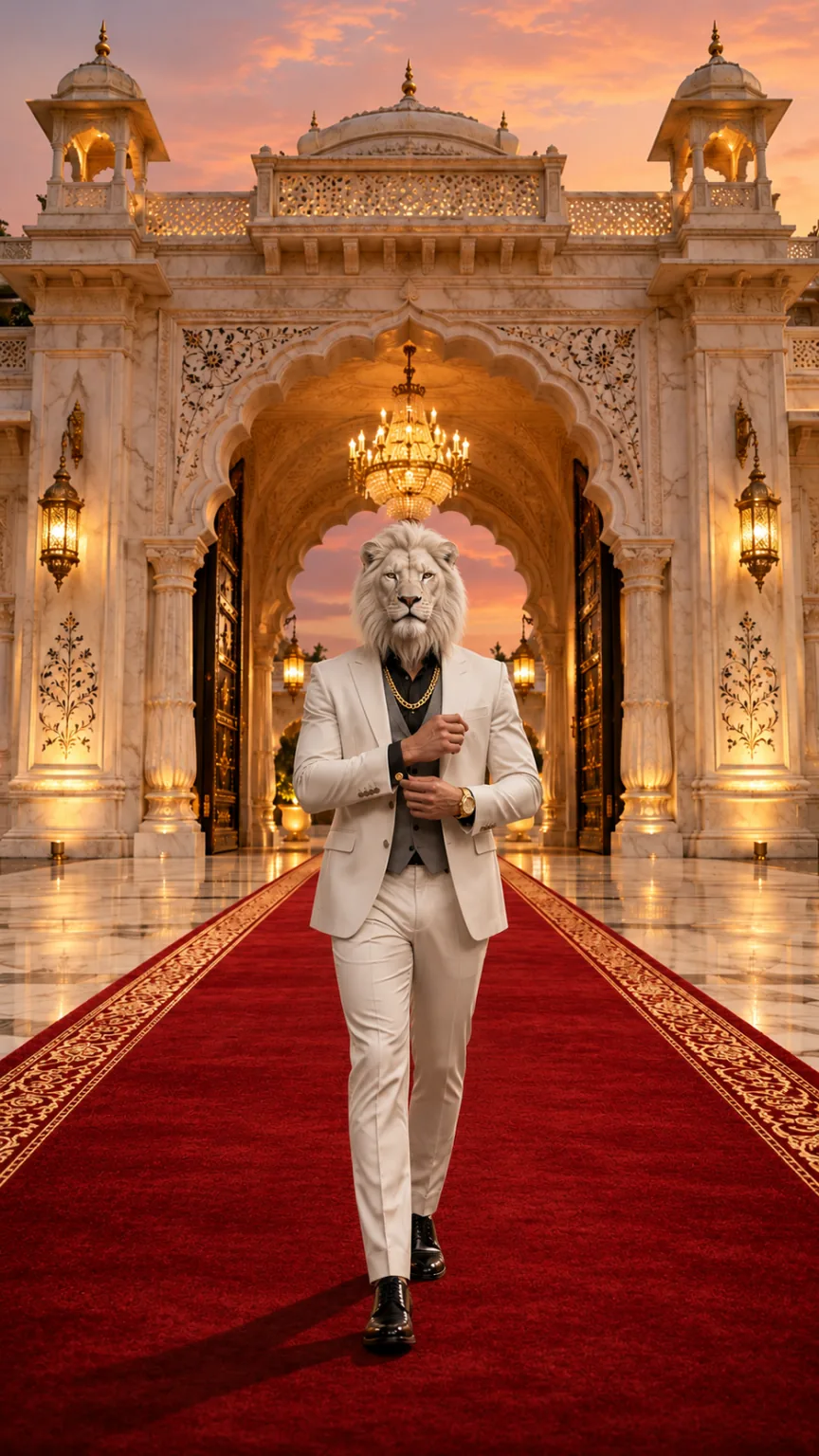
Choose Become Sheru Bhai for a white-lion head, a white three-piece suit and a red-carpet entrance at a palace gate. Choose the duo scene for your own face, a black suit and a slow walk beside the boss on a supercar driveway at night.
| Mode | What it does | Best photo | Credits |
|---|---|---|---|
| Become Sheru Bhai | Replaces your face with a white-lion head for the palace-gate boss entry | Standing, knees-up or full length, with both hands visible | 236 (480p) / 516 (720p) |
| You + Sheru Bhai | Keeps your face and puts you in a black suit beside the white-lion boss | Standing, knees-up or full length, with a sharp, front-facing face | 236 (480p) / 516 (720p) |
Step 3 — Generate in the Studio
Sign in and open the studio, then upload your photo and select your scene and video quality. The scene prompts are already built in, so you do not need to write one.
The studio makes the still photo first, then animates that image into the video. Allow about 3–8 minutes; you can leave the page while it runs and return to resume the task view.
Step 4 — Download Your Photo and Video
Save the still photo separately if you want a profile picture or status image. It is the first frame used to make your video.
Download the 8-second, 9:16 MP4 at your chosen 480p or 720p quality, without a watermark. It includes original AI music and sound effects, with no vocals or dialogue.
Step 5 — Post It Responsibly
- Add a Hindi or Urdu line or trending audio in Instagram, CapCut or InShot if you want it in the post.
- Label the result as AI-generated when you share it.
- Use only your own photo or a photo of an adult who agreed to take part.
Free Sheru Bhai AI Prompts for Photo and Video
These are the scene prompts this site runs for the Sheru Bhai photo and the entry video. Copy them into an image or video model that accepts a reference image; results depend on the model you choose.
English prompts work best. On this site, the prompts are built in, so you can upload your photo and choose a scene without writing anything.
Sheru Bhai AI photo prompt
Keep image 1 exactly: the marble palace gate, the red carpet, the golden dusk light and the low camera angle. Place one full-body figure in the center of the red carpet, walking toward the camera. Build this figure from the adult person in image 2: keep their body build, height, posture, skin tone on the hands and their rings or watch if visible. Replace the whole head with a photorealistic majestic white lion head with a thick snowy mane, calm amber eyes and mouth closed, attached naturally to the neck and in proportion with the shoulders (not oversized, not floating). Dress the figure in a tailored white three-piece suit with a grey waistcoat, black shirt, a thick gold chain, a gold watch and polished white shoes. Exactly one figure, five fingers on each hand. No other people or animals, no added text, logos or watermark. Photorealistic, vertical 9:16.You + Sheru Bhai photo prompt
Keep image 1 exactly: the wet night driveway, the two black supercars with headlights on, the mist, the lighting and the white-lion-headed boss in the white suit on the right. Add the adult person from image 2 on the left, full body, walking side by side with the lion boss toward the camera, dressed in a sharp black suit. Keep the person's face, hairstyle, skin tone and body from image 2 clearly recognizable; the person keeps a human head. Exactly two figures: the person and the lion boss. No added text, logos, badges, license plates or watermark. Photorealistic, vertical 9:16.Sheru Bhai AI video prompt
Animate the image as the first frame. One continuous 8-second vertical 9:16 shot with no cuts. Keep every figure, face, outfit and the background exactly as in the first frame in every frame. The lion head stays attached to the neck, keeps the same size and the mouth stays closed: no roaring, no bared teeth, no talking. 0–3s: the lion-headed boss walks slowly down the red carpet toward the camera while the camera tracks backward at carpet level. 3–5s: he adjusts his gold cufflink without breaking stride, the gold chain catching the light. 5–6.5s: he glances over one shoulder, then back. 6.5–8s: he stops close to the camera and holds a calm, powerful stare into the lens with a slight nod. Real weight and natural movement, five fingers on each hand, natural human proportions. No extra people or animals, no captions, logos or watermarks. Photorealistic cinematic look, no morphing, no drifting of faces or background over time. Audio: a deep cinematic bass hit at the start, footsteps, cloth movement and room ambience, with an original slow, heavy hip-hop style instrumental. No vocals, singing, humming, spoken words, lyrics or melody quoted from an existing song.Photo Do's and Don'ts
Do
- Use a standing photo from the knees up or full length.
- Keep both hands visible in even lighting.
- Choose a sharp, front-facing face for the duo scene.
Don't
- Avoid hats, hoods and sunglasses.
- Do not upload photos of minors, celebrities, public figures or politicians.
- Do not use pet photos or cartoon characters; the scenes support adult photos only.
Troubleshooting
The lion head looks too big or floats above the collar
Try again with a standing photo from the knees up or full length. Keep both hands visible and use even lighting.
My face changed in You + Sheru Bhai
Retry with a sharp, front-facing photo and no sunglasses. The duo scene is designed to keep your face, hairstyle, skin tone and build.
The generation is taking a while
Generation has two steps: the still photo, then the video. About 3–8 minutes is normal, and you can leave the page while it runs in the background.
The video looks soft
Choose 720p for the higher-resolution video. It costs 516 credits ($5.16), including the photo step.
Keep Reading
Sheru Bhai AI Video FAQ
Sign in, upload one adult photo and choose the boss entrance or the duo walk. Generate the still photo and video, then download both. The scene prompts are built in.