
一步步制作 Sheru Bhai AI 视频与照片
更新于 2026 年 11 月 12 日
快速解答
上传一张成年人照片,选择宫殿大门前的大佬出场或双人同行,即可生成静态照片和 8 秒视频。含照片步骤的总费用为 480p 236 积分($2.36)或 720p 516 积分($5.16)。下载两者,若需要人声,可在发布时自行添加对白。
你需要准备什么
- 一张你本人或已同意参与的成年人的照片,支持 JPG、PNG 或 WebP,最大 10 MB。
- 一个账号,生成前需要登录。
- 购买积分包:$5 可得 500 积分、$9 可得 900 积分、$19 可得 1,900 积分,无需订阅。
第 1 步——选择合适的照片
使用膝盖以上或全身的站姿照片,确保双手可见、光线均匀,让大佬场景清楚识别你的体型和姿态。
双人场景请选正面清晰照,确保面部清楚可见。避免帽子、兜帽和太阳镜。
第 2 步——选择“变身 Sheru Bhai”或“你 + Sheru Bhai”
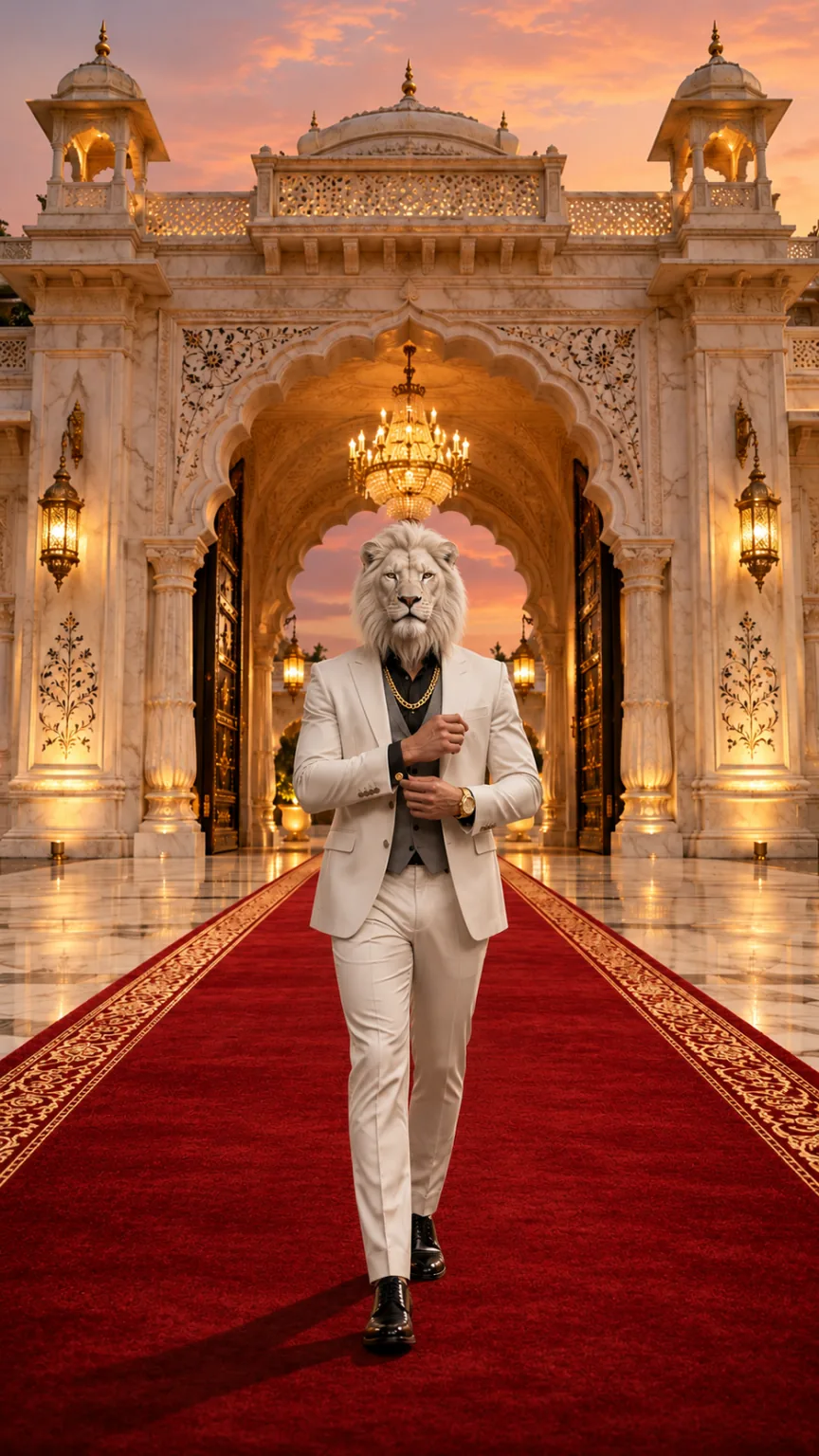
选择“变身 Sheru Bhai”,获得白狮头、白色三件套西装和宫殿大门前的红毯出场。选择双人场景,保留自己的脸,身穿黑色西装,夜晚在超级跑车车道上与大佬缓步同行。
| 模式 | 效果 | 推荐照片 | 积分 |
|---|---|---|---|
| 变身 Sheru Bhai | 将脸替换为白狮头,在宫殿大门前以大佬身份出场 | 站姿,膝盖以上或全身,双手可见 | 236(480p)/516(720p) |
| 你 + Sheru Bhai | 保留你的脸,身穿黑色西装站在白狮大佬身边 | 站姿,膝盖以上或全身,面部正面清晰 | 236(480p)/516(720p) |
第 3 步——在工作室生成
登录并打开工作室,上传照片,选择场景和视频画质。场景提示词已内置,无需自行编写。
工作室先生成静态照片,再将照片制作成视频。通常需要约 3–8 分钟;期间可以离开页面,返回后继续查看任务。
第 4 步——下载照片与视频
如果需要头像或状态配图,可以单独保存静态照片。它也是制作视频所用的首帧。
下载所选 480p 或 720p 画质的 8 秒、9:16 MP4 视频,无水印。包含原创 AI 音乐与音效,没有人声或对白。
第 5 步——负责任地发布
- 如需在帖子中加入印地语或乌尔都语台词或热门音频,可使用 Instagram、CapCut 或 InShot。
- 分享时注明作品由 AI 生成。
- 只使用你本人或已同意参与的成年人的照片。
免费的 Sheru Bhai AI 照片与视频提示词
这些是本站生成 Sheru Bhai 照片和出场视频时使用的场景提示词。可复制到支持参考图的图像或视频模型中,效果取决于所选模型。
英文提示词效果最佳。本站已内置提示词,只需上传照片并选择场景,无需编写任何内容。
Sheru Bhai AI 照片提示词
Keep image 1 exactly: the marble palace gate, the red carpet, the golden dusk light and the low camera angle. Place one full-body figure in the center of the red carpet, walking toward the camera. Build this figure from the adult person in image 2: keep their body build, height, posture, skin tone on the hands and their rings or watch if visible. Replace the whole head with a photorealistic majestic white lion head with a thick snowy mane, calm amber eyes and mouth closed, attached naturally to the neck and in proportion with the shoulders (not oversized, not floating). Dress the figure in a tailored white three-piece suit with a grey waistcoat, black shirt, a thick gold chain, a gold watch and polished white shoes. Exactly one figure, five fingers on each hand. No other people or animals, no added text, logos or watermark. Photorealistic, vertical 9:16.“你 + Sheru Bhai”照片提示词
Keep image 1 exactly: the wet night driveway, the two black supercars with headlights on, the mist, the lighting and the white-lion-headed boss in the white suit on the right. Add the adult person from image 2 on the left, full body, walking side by side with the lion boss toward the camera, dressed in a sharp black suit. Keep the person's face, hairstyle, skin tone and body from image 2 clearly recognizable; the person keeps a human head. Exactly two figures: the person and the lion boss. No added text, logos, badges, license plates or watermark. Photorealistic, vertical 9:16.Sheru Bhai AI 视频提示词
Animate the image as the first frame. One continuous 8-second vertical 9:16 shot with no cuts. Keep every figure, face, outfit and the background exactly as in the first frame in every frame. The lion head stays attached to the neck, keeps the same size and the mouth stays closed: no roaring, no bared teeth, no talking. 0–3s: the lion-headed boss walks slowly down the red carpet toward the camera while the camera tracks backward at carpet level. 3–5s: he adjusts his gold cufflink without breaking stride, the gold chain catching the light. 5–6.5s: he glances over one shoulder, then back. 6.5–8s: he stops close to the camera and holds a calm, powerful stare into the lens with a slight nod. Real weight and natural movement, five fingers on each hand, natural human proportions. No extra people or animals, no captions, logos or watermarks. Photorealistic cinematic look, no morphing, no drifting of faces or background over time. Audio: a deep cinematic bass hit at the start, footsteps, cloth movement and room ambience, with an original slow, heavy hip-hop style instrumental. No vocals, singing, humming, spoken words, lyrics or melody quoted from an existing song.照片选择建议与禁忌
推荐
- 使用膝盖以上或全身的站姿照片。
- 确保双手可见、光线均匀。
- 双人场景选择面部正面清晰的照片。
避免
- 避免帽子、兜帽和太阳镜。
- 不要上传未成年人、名人、公众人物或政治人物的照片。
- 不要使用宠物照片或卡通角色;场景仅支持成年人照片。
问题排查
狮头过大或悬在衣领上方
换用膝盖以上或全身的站姿照片重试。确保双手可见,并使用均匀光线。
“你 + Sheru Bhai”中的脸变了
使用清晰的正面照重试,不戴太阳镜。双人场景旨在保留你的面容、发型、肤色和体型。
生成耗时较长
生成分为静态照片和视频两步。约 3–8 分钟属于正常范围,后台运行时可以离开页面。
视频不够清晰
选择 720p 可获得更高分辨率的视频。费用为 516 积分($5.16),含照片步骤。
继续阅读
Sheru Bhai AI 视频常见问题
登录后上传一张成年人照片,选择大佬出场或双人同行。生成静态照片和视频,再下载两者。场景提示词已内置。