
Sheru Bhai AI 動画と写真を順番に作る方法
2026年11月12日更新
すぐわかる作り方
大人の写真を1枚アップロードし、宮殿の門前でのボス登場か2人で歩く場面を選び、静止画と8秒の動画を生成します。写真工程を含む合計は480pで236クレジット($2.36)、720pで516クレジット($5.16)です。両方をダウンロードし、声が欲しい場合は投稿時に台詞を追加してください。
必要なもの
- 自分、または同意した大人の写真1枚です。JPG、PNG、WebP形式で、最大10 MBに対応します。
- 生成前にログインするためのアカウントです。
- 有料クレジットパックです。$5で500、$9で900、$19で1,900クレジットを購入でき、定期契約は不要です。
ステップ1 — 適切な写真を選びます
膝から上または全身の立ち姿で、両手が見え、光が均一な写真を使ってください。ボスの場面で体格や姿勢を把握しやすくなります。
2人の場面では、顔がはっきり見える鮮明な正面写真を選んでください。帽子、フード、サングラスは避けてください。
ステップ2 — 「Sheru Bhaiになる」か「あなた + Sheru Bhai」を選びます
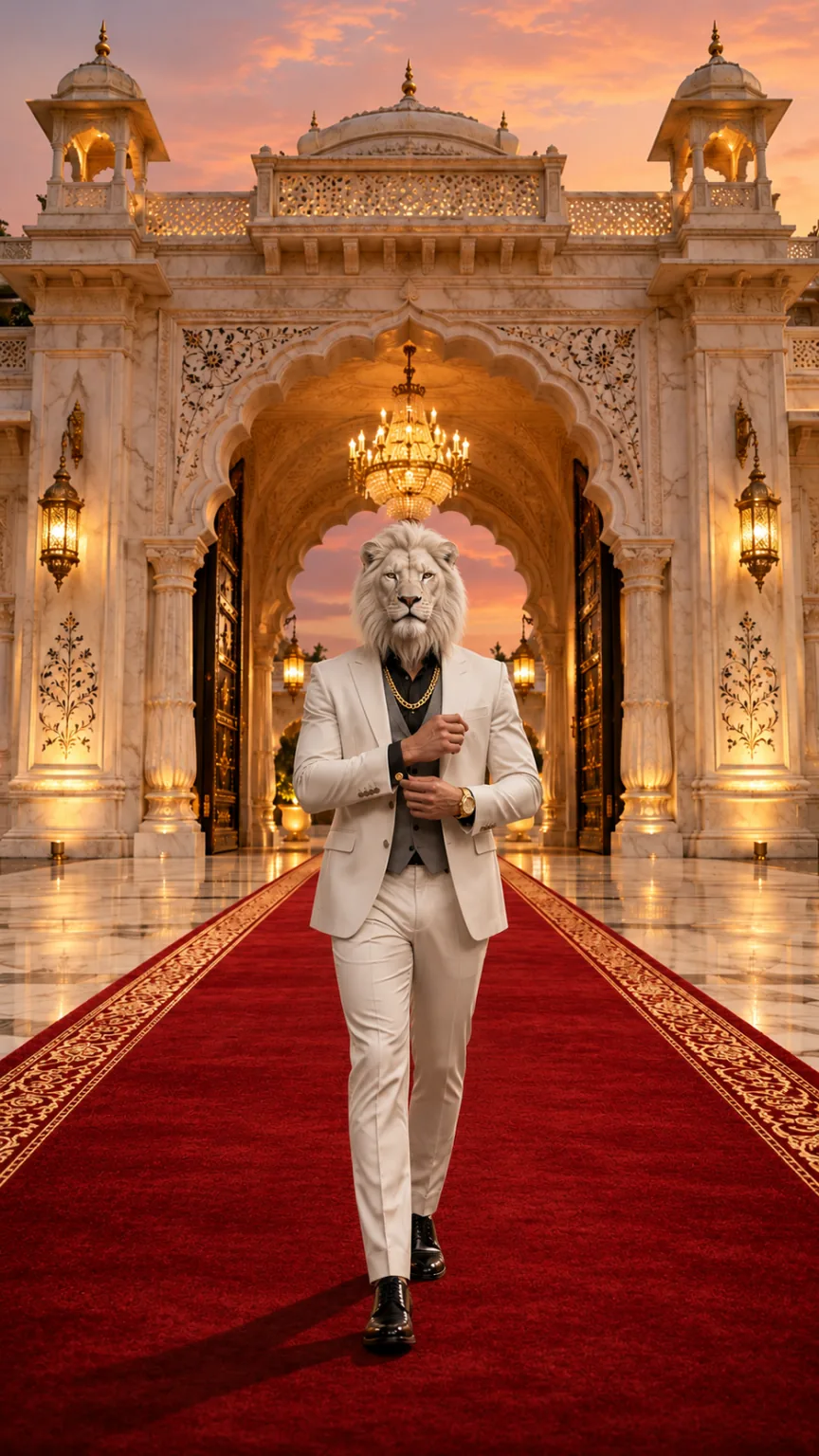
「Sheru Bhaiになる」では白いライオンの頭、白いスリーピーススーツ、宮殿の門前のレッドカーペットでの登場を作れます。2人の場面では自分の顔を残し、黒いスーツで夜のスーパーカーが並ぶ車寄せをボスとゆっくり歩きます。
| モード | 内容 | おすすめの写真 | クレジット |
|---|---|---|---|
| Sheru Bhaiになる | 顔を白いライオンの頭に変え、宮殿の門前でボスとして登場します | 立ち姿、膝から上か全身、両手が見える写真 | 236 (480p) / 516 (720p) |
| あなた + Sheru Bhai | 顔を残し、黒いスーツで白いライオンボスの隣に並びます | 立ち姿、膝から上か全身、顔が鮮明な正面写真 | 236 (480p) / 516 (720p) |
ステップ3 — スタジオで生成します
ログインしてスタジオを開き、写真をアップロードしてシーンと画質を選びます。シーンのプロンプトは内蔵されているため、書く必要はありません。
まず静止画を作り、次にその画像を動画にします。目安は約3–8分です。処理中はページを離れ、戻ってタスク表示を再開できます。
ステップ4 — 写真と動画をダウンロードします
プロフィールやステータス用の画像が必要なら、静止画を個別に保存してください。動画の最初のフレームとして使われる画像です。
選んだ480pまたは720pで、8秒・9:16の透かしなし MP4 をダウンロードします。オリジナルの AI 音楽と効果音を含み、歌声や会話はありません。
ステップ5 — 責任を持って投稿します
- 必要なら Instagram、CapCut、InShot でヒンディー語やウルドゥー語の台詞、または人気の音源を追加してください。
- 共有時は AI 生成であることを表示してください。
- 自分自身、または参加に同意した大人の写真だけを使ってください。
Sheru Bhai AI 写真・動画用の無料プロンプト
当サイトで Sheru Bhai の写真と登場動画を作る際に使うシーンプロンプトです。参照画像に対応した画像・動画モデルにコピーできます。結果は選ぶモデルによって異なります。
英語のプロンプトが最も適しています。当サイトでは内蔵されているため、写真をアップロードしてシーンを選ぶだけで、何も書く必要はありません。
Sheru Bhai AI 写真用プロンプト
Keep image 1 exactly: the marble palace gate, the red carpet, the golden dusk light and the low camera angle. Place one full-body figure in the center of the red carpet, walking toward the camera. Build this figure from the adult person in image 2: keep their body build, height, posture, skin tone on the hands and their rings or watch if visible. Replace the whole head with a photorealistic majestic white lion head with a thick snowy mane, calm amber eyes and mouth closed, attached naturally to the neck and in proportion with the shoulders (not oversized, not floating). Dress the figure in a tailored white three-piece suit with a grey waistcoat, black shirt, a thick gold chain, a gold watch and polished white shoes. Exactly one figure, five fingers on each hand. No other people or animals, no added text, logos or watermark. Photorealistic, vertical 9:16.あなた + Sheru Bhai 写真用プロンプト
Keep image 1 exactly: the wet night driveway, the two black supercars with headlights on, the mist, the lighting and the white-lion-headed boss in the white suit on the right. Add the adult person from image 2 on the left, full body, walking side by side with the lion boss toward the camera, dressed in a sharp black suit. Keep the person's face, hairstyle, skin tone and body from image 2 clearly recognizable; the person keeps a human head. Exactly two figures: the person and the lion boss. No added text, logos, badges, license plates or watermark. Photorealistic, vertical 9:16.Sheru Bhai AI 動画用プロンプト
Animate the image as the first frame. One continuous 8-second vertical 9:16 shot with no cuts. Keep every figure, face, outfit and the background exactly as in the first frame in every frame. The lion head stays attached to the neck, keeps the same size and the mouth stays closed: no roaring, no bared teeth, no talking. 0–3s: the lion-headed boss walks slowly down the red carpet toward the camera while the camera tracks backward at carpet level. 3–5s: he adjusts his gold cufflink without breaking stride, the gold chain catching the light. 5–6.5s: he glances over one shoulder, then back. 6.5–8s: he stops close to the camera and holds a calm, powerful stare into the lens with a slight nod. Real weight and natural movement, five fingers on each hand, natural human proportions. No extra people or animals, no captions, logos or watermarks. Photorealistic cinematic look, no morphing, no drifting of faces or background over time. Audio: a deep cinematic bass hit at the start, footsteps, cloth movement and room ambience, with an original slow, heavy hip-hop style instrumental. No vocals, singing, humming, spoken words, lyrics or melody quoted from an existing song.写真選びのポイントと注意事項
おすすめ
- 膝から上、または全身が写った立ち姿の写真を使ってください。
- 両手が見え、光が均一になるようにしてください。
- 2人の場面では、顔が鮮明な正面写真を選んでください。
避けること
- 帽子、フード、サングラスは避けてください。
- 未成年者、有名人、公人、政治家の写真はアップロードしないでください。
- ペットの写真やアニメのキャラクターは使わないでください。大人の写真のみ対応しています。
困ったときの対処法
ライオンの頭が大きすぎる、または襟の上に浮いています
膝から上または全身の立ち姿で再度お試しください。両手が見え、光が均一な写真を使ってください。
「あなた + Sheru Bhai」で顔が変わりました
サングラスのない鮮明な正面写真で再度お試しください。2人の場面は顔、髪型、肌の色、体格を保つ設計です。
生成に時間がかかっています
生成は静止画と動画の2段階です。約3–8分は通常の範囲です。バックグラウンドで処理される間はページを離れられます。
動画がぼやけて見えます
高解像度にするには720pを選んでください。写真工程を含め516クレジット($5.16)です。
あわせて読む
Sheru Bhai AI 動画のよくある質問
ログインして大人の写真を1枚アップロードし、ボス登場か2人で歩く場面を選びます。静止画と動画を生成して両方をダウンロードしてください。シーンのプロンプトは内蔵されています。